CONTACT: project.familysafety@gmail.com
Hi!
My name is Johanna Karlsson, and I am developing a project with one clear mission: to make the internet and online gaming safer for children.
What happens when a child encounters something frightening or inappropriate online and doesn’t know what to do?
One Button. Immediate Help.
When a child is being attaced or feels unsafe, every second matters.
Panicbutton provides a simple emergency button designed specifically for children. By holding the button for a few seconds, the app begins a predefined safety process, helping preserve important information and immediately notifying a trusted parent or guardian.
Every day, children can face harassment, grooming, bullying, threats, or other harmful behavior while playing online. In many situations, there is no simple or immediate way for them to ask for help – untill now!
That is why I am developing a safety app designed to give children a quick and easy way to alert a trusted parent when they feel unsafe.
To create one of the world’s most trusted digital safety platforms for children.
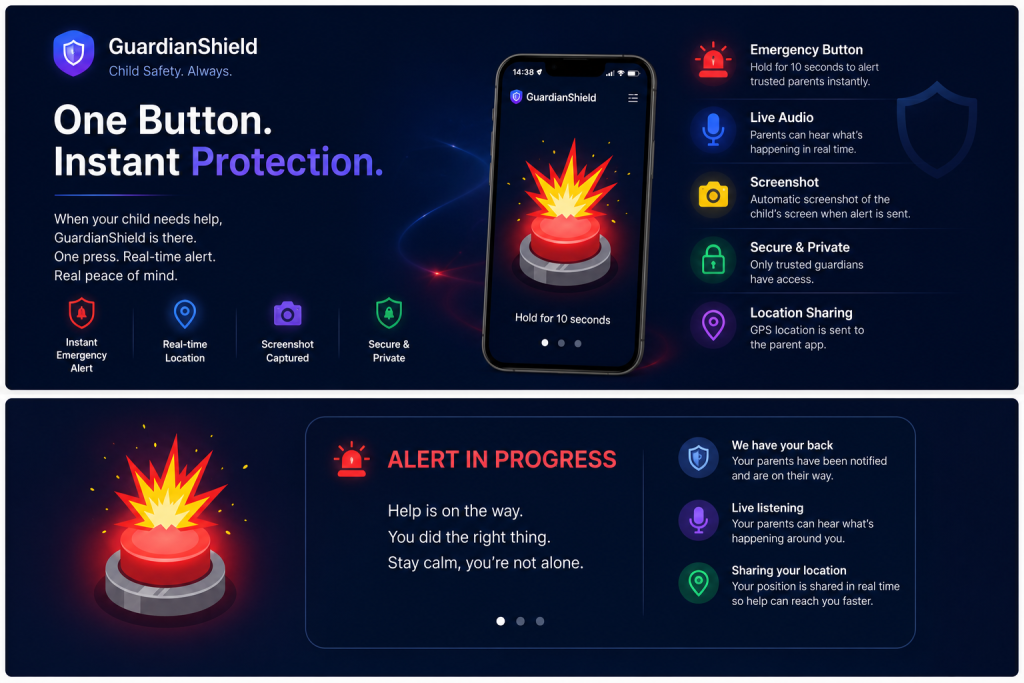
Simple to use. Fast to activate.
Designed to provide reassurance when it matters most – before its to late.
We believe every family deserves access to simple, effective tools that help children stay safe while exploring the online world.
By combining technology, education, and responsible design, we aim to make the internet a safer place for future generations.
Built for Real Families

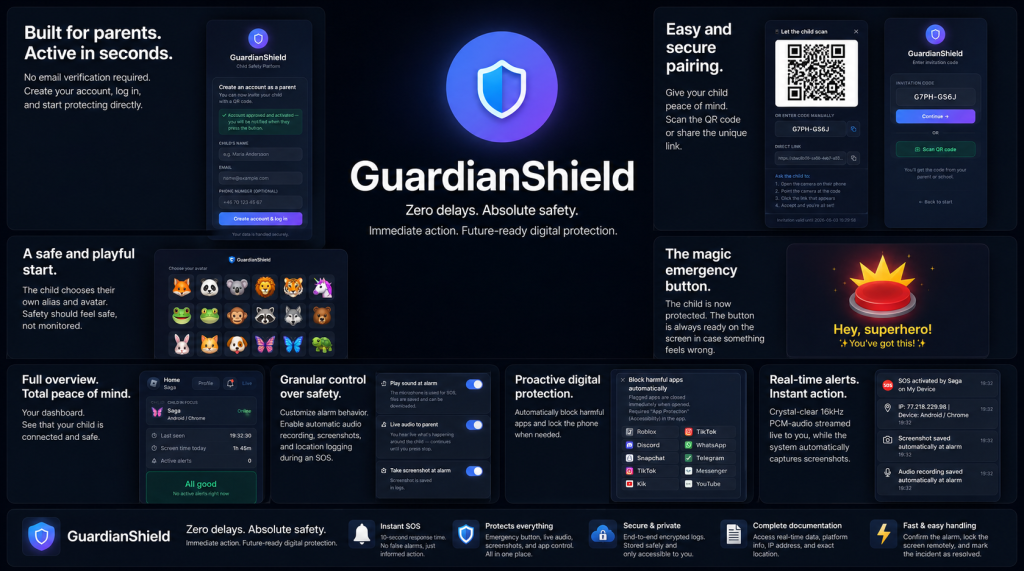
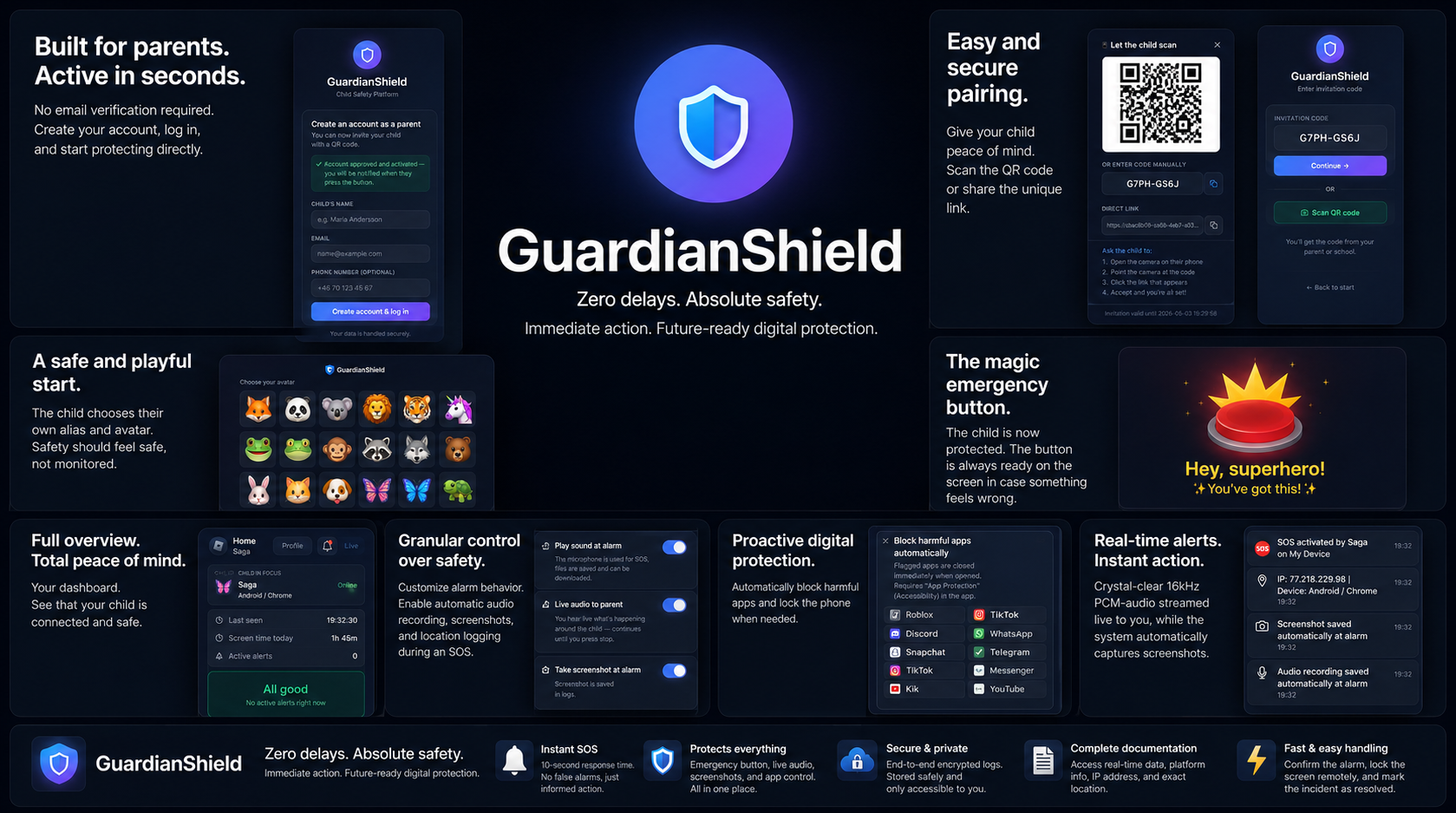
The Panicbutton connects children and parents through a secure safety platform.
For Children
✔ Easy-to-use Panic Button
✔ Calm, child-friendly interface
✔ Designed to reduce stress during emergencies
✔ Quick access to trusted adults
—
For Parents
✔ Instant emergency notifications
✔ Incident timeline, saving evidence and activity logs
✔ Review important information in one place
✔ Manage family safety settings
—
Education Saves Lives
Technology is only one part of keeping children safe.
Guardian Shield also provides educational resources that help parents recognize warning signs before problems escalate.
Learn about:
• Online Grooming
• Cyberbullying
• Digital Manipulation
• Online Predators
• Privacy & Online Safety
Knowledge gives families the confidence to protect their children.
—
Together We Can Make a Difference
Every child deserves to feel safe.
Every parent deserves peace of mind.
Together, we can build a safer digital future.
Protecting Children. Empowering Families.
Because every child deserves to feel safe.
CONTACT: project.familysafety@gmail.com
Children spend more time online than ever before—playing games, chatting with friends, and exploring digital worlds. While these experiences can be positive, they also expose children to risks such as grooming, cyberbullying, harassment, scams, and inappropriate content.
Guardian Shield was created to help families face these challenges with confidence.
Privacy Comes First
Children’s safety should never come at the expense of their privacy.
The panicbutton is being designed with responsible security and privacy principles, ensuring that families remain in control of their own information while providing the tools needed to respond to concerning situations.
The goal is to create a child-friendly emergency button that allows a child to quickly report an uncomfortable situation while helping parents respond as soon as possible.
The project is being developed step by step with a strong focus on child safety, evidence, privacy, and ease of use.
Unique Features of the App – You’re in Complete Control!
When the child triggers an emergency alarm, the app automatically captures a screenshot of whatever is currently displayed on the child’s device (e.g., Roblox, TikTok, or any other app the child is using). This is a high-priority feature.
One Button. Immediate Help.
When a child feels unsafe, every second matters.
Guardian Shield provides a simple emergency button designed specifically for children. By holding the button for a few seconds, the app begins a predefined safety process, helping preserve important information and immediately notifying a trusted parent or guardian.
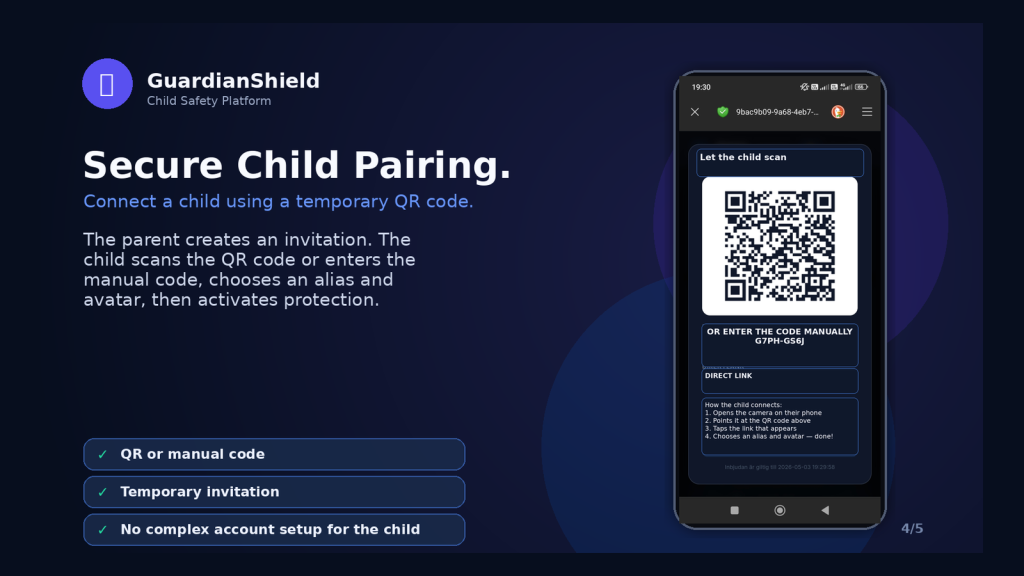
GuardianShield – Feature and Settings List
Child App
🚨 Emergency Button
- Floating button above other apps
- Draggable position
- Adjustable size
- Configurable hold countdown duration
- Visual countdown indicator
- Audible beep every second
- Vibration feedback
- Can be locked in position
- Automatically hide during screenshots
- Parent receve the evidence
- Reappears after an alert
- Restarts after device reboot
- Offline support
🚨 During an Alert
Automatically when activaded in settings:
- Creates an incident ID
- Saves locally first
- GPS location capture
- Screenshot capture
- Active app detection
- Timestamps
- Audio recording
- Voice message support
- Push notifications to all guardians
- Real-time status updates
- Offline queue during network outages
- Automatic upload when connectivity returns
Parents Receive:
- Location
- Screenshot
- App name
- Timestamp
- Status
- Child information
🎤 Audio Features
Live Audio
- Parent can start live listening
- Child sees a clear indicator
- Time-limited sessions
- Can be ended by either party
Voice Messages
Parent → Child:
- Record voice message
- Delivered instantly
Child → Parent:
- Reply with voice message
- Stored in the incident log
📷 Evidence Management
Each incident can include:
- Screenshots
- Audio recordings
- Voice messages
- GPS data
- Active app information
- Action log
- Timeline
Hashing:
- SHA-256 for evidence integrity verification
📍 Location and Maps
Live Map
Parents can see:
- Child’s live location
- Last update timestamp
- Movement history
Activity Map
- Historical locations
- Alert locations
- Geofence events
🏫 Geofencing and Safe Zones
Zone Types:
- Home
- School
- Activities
- Custom zones
Settings:
- Radius
- Arrival notifications
- Departure notifications
- Both
🏠 Safe Arrival Monitoring
Parents choose:
- Destination
- Expected arrival time
- Grace period
The system:
- Monitors the journey
- Sends alerts if delayed
- Automatically marks arrival
🔒 App Management – Block
Per child:
Block rekommended Apps
- Roblox
- TikTok
- Snapchat
- Discord
- YouTube
Custom Apps
- Custom package names
- Custom rules
Available Actions:
- Never block
- Warning only
- Block after screenshot capture
- Block immediately during an alert
📱 App Blocking
Capabilities:
- Close apps
- Prevent reopening
- Display a protection screen
Supported Methods:
- Accessibility Service
- Device Admin
- Device Owner
🛡 Protection System
Monitors:
- Overlay permission
- Device Admin status
- Accessibility Service
- GPS
- Background location access
- Microphone permission
- Screen sharing
- Notifications
- Battery optimization settings
🔄 Protection Recovery
Parent taps:
🛡 Reactivate Protection
The child receives:
- Step-by-step guide
- Android permission dialogs
- Restoration of:
- Overlay permission
- GPS access
- Accessibility Service
- Device Admin
- Microphone access
- Notification permissions
🔍 Tamper Detection
Triggers alerts if:
- The app is disabled
- The overlay disappears
- GPS is disabled
- Accessibility Service is disabled
- Device Admin is removed
- Background location access is lost
👨👩👧 Guardians
Supports multiple guardians.
Roles:
- Primary Guardian
- Guardian
- View Only
Permissions:
- Live location
- Evidence access
- Audio access
- App management
- Zones
- Alert acknowledgement
🚑 Alert Actions
During an active alert:
- 📞 Call the child
- 🎤 Listen live
- 🎙 Send voice message
- 📥 Retrieve voice messages
- 📍 Open live map
- 📷 View evidence
- 🔒 Lock apps
- 🔓 Unlock apps
- 🛡 Reactivate protection
- 🚑 Call emergency services (112)
- ✔ Mark as resolved
🌐 Backend – Encrypted and SSL-secured storageSecure encrypted storage with SSL protection
GuardianShield uses encrypted storage, SSL/TLS secured communication, and modern security standards to ensure that all personal data, evidence, and incident information remain protected and private.
Encrypted storage, SSL/TLS secured communication, SHA-256 evidence integrity verification, secure authentication, and role-based access control ensure that GuardianShield protects sensitive information at every stage.
Handles:
- Users
- Children
- Devices
- Alerts
- Evidence
- Commands
- Guardians
- Geofences
- Safe arrival monitoring
💾 Offline Features
- Alert queue
- Image queue
- Audio queue
- GPS queue
- Automatic retransmission
- Resume after reboot
⚙ Parent Settings
Per child:
Emergency Button
- Size
- Hold duration
- Halo effect
- Vibration
- Sound
- Draggable position
- Countdown indicator
- Beep sound
Alerts
- GPS during alerts
- Screenshot capture
- Audio recording
- Live audio
- Voice messages
Location
- Alerts only
- Continuous tracking
Protection
- App blocking
- Protection recovery
- Tamper detection
What is grooming?
Parent Support – Safer Online
Children should be able to play, chat and have fun online without feeling afraid or alone. As a parent or caregiver, you do not need to know everything about apps, games or technology. What matters most is that your child knows you will listen, take them seriously and help them without blame.
Grooming is when someone contacts a child with the intention of sexually exploiting them. The person may be an adult, but may pretend to be the same age as the child or someone the child already knows.
Contact can begin through games, chats, social media or video calls. Sometimes trust is built slowly over time. In other cases, the person quickly starts asking for pictures, sexual content, nude images or an in-person meeting.
It is never the child’s fault if someone tries to deceive, pressure or exploit them.
What grooming can look like
A person trying to exploit a child may:
- be unusually kind, give excessive praise or say that the child is special
- pretend to share the same interests, age or personal problems
- ask the child to move the conversation to a private app, chat or another game
- want the contact to be secret: “Don’t tell your parents”
- offer game currency, gifts, money or help in a game
- ask for a name, address, school, phone number, photos or other private information
- ask the child to turn on their camera, send images or do something in front of the camera
- threaten, pressure or blackmail the child after receiving an image or personal information.
A warning sign does not always mean that a crime has happened. However, it is always a reason to speak calmly with the child.
Signs that a child may need support
Children react in different ways. Pay attention if your child suddenly:
- seems worried, low in mood or afraid of receiving messages
- becomes secretive or tries to hide who they are talking to
- receives unexpected money, gifts or game currency
- becomes stressed when their phone, game or online activity is mentioned
- sleeps poorly or no longer wants to play games they previously enjoyed
- talks about threats, nude images, strange questions or someone wanting to meet them.
Ask without accusing them. For example:
“Has anyone online said or done something that made you feel uncomfortable?”
“Do you know how to block and report someone in the game?”
“You can always tell me, even if you think you have done something wrong.”
How to reduce the risk
Talk about online life regularly, not only when something has gone wrong. Show interest in your child’s games, friends and apps.
Try doing these things together:
- Review privacy settings and limit contact from unknown people.
- Practise blocking, reporting and taking screenshots in the apps and games your child uses.
- Agree that your child never needs to send pictures, turn on their camera or share private information to keep a friend.
- Decide which trusted adults your child can talk to: a parent, relative, teacher, school counsellor or coach.
- Make it clear that your child will not get into trouble at home for speaking up. Their safety comes first.
If your child tells you something
- Stay calm. Thank your child for telling you.
- Make it clear that it is not their fault.
- Stop the contact. Block the person and avoid continuing the conversation.
- Save relevant details. Write down usernames, account names, platform, dates, times, messages and links. Take screenshots of conversations where safe to do so.
- Report the account. Use the reporting tools in the game, app or social media platform.
- Report suspected crime. Contact your local police or child-protection authority. Call your local emergency number if the child is in immediate danger or a crime is happening now.
- Seek support. Your child may need to speak with a school counsellor, healthcare professional or another trusted adult.
Do not forward, repost or share sensitive images or videos. If sexual images of a child are involved, avoid downloading or making further copies. Preserve account details, links and messages, then contact police or a specialist reporting service for guidance.
Sexual extortion
Sexual extortion may begin when someone asks for a picture or video. Afterwards, the person may threaten to share the material unless the child sends more images, pays money or does something else.
Tell your child:
“You never have to do what someone online tells you to do.”
“The threats are not your fault.”
“Tell a trusted adult straight away, and we will deal with it together.”
Online hate, threats and harassment
Online harm can include cruel comments, threats, rumours, fake accounts or sharing images without permission.
Help your child to:
- avoid replying in anger
- save relevant evidence
- block and report the account
- tell a trusted adult
- contact the school if the situation involves people from the child’s everyday life.
Global contacts and reporting routes
Immediate danger or an ongoing crime: Call your local emergency number. In the European Union, call 112 free of charge.
Local police or child-protection services: Report suspected crimes, threats, sexual exploitation or a planned meeting with an adult.
Child helpline: Use Child Helpline International to find a child helpline in your country. Child helplines can offer confidential support by phone, chat or other local services.
Report child sexual abuse material: Use INHOPE to find an appropriate national reporting hotline. These hotlines handle reports of suspected child sexual abuse material online.
Report inside the platform: Use the reporting and blocking tools in the game, app, website or social media service where the contact happened.
Trusted adults and local support: A parent, guardian, teacher, school counsellor, healthcare professional or youth worker can help the child take the next step.
Remember
Children should not have to deal with difficult experiences online on their own.
Speaking up takes courage.
Listening without blame can make a real difference.
Trusted adults are a child’s strongest protection.
Contact: project.familysafety@gmail.com